Redo your website for the business you run now.
Paste your current URL. Redo Page turns its pages, photos, services, and reviews into an editable first draft in minutes.
Build and preview free. Publish for $30/month.
No website yet? Start from scratch
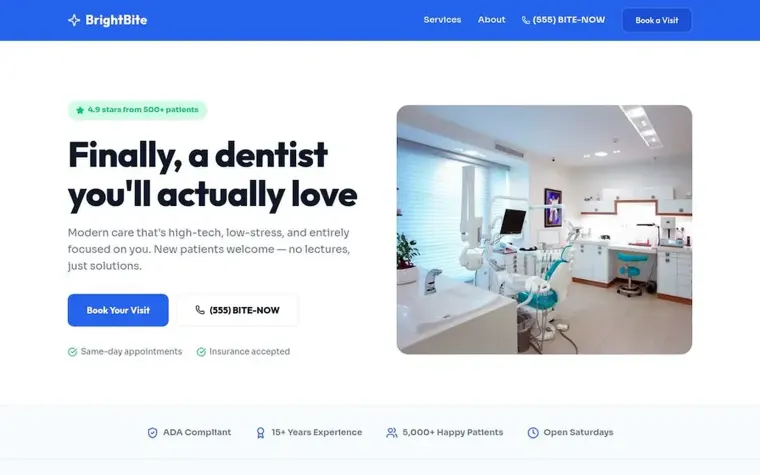

Drag the line to compare the same dental practice. Notice how the emergency booking path becomes the main action.
- Minutes
- to an editable first draft
- Stays live
- your current site while you edit
- You decide
- when the new site replaces it
Four ways to bring your website up to date.
The tradeoff is time, cost, and who handles the next edit.
Redo Page starts with the site you already have.
Keep the useful parts. Change the rest. The new pages stay editable after launch.
- Keep the parts worth keeping
- Redo Page brings over services, photos, pages, offers, and reviews. You decide what stays and what needs work.
- Say what should change
- Move an offer up, shorten the intro, cut a page, or make one action easier to find.
- Keep editing after launch
- Change text, SEO, forms, photos, and pages whenever the business changes.
Tell Redo Page what you want changed.
Write the request the way you would send it to a website person. Review the change, then keep going.
“Bring my pricing up to the homepage and cut the long intro.”
“Make it obvious we serve the whole metro area, not just downtown.”
“Pull my five-star reviews onto the front page.”
“Swap every stock photo for the real ones from my gallery.”
“Add a quote-request form and put the button in the header.”
“Most of my customers use a phone. Make every page readable there.”
How the first draft comes together.
Start with the URL. Redo Page builds the draft, and you decide what needs another pass before publishing.
- Paste the site you have
- Redo Page brings over its pages, words, photos, and business details. The first draft can be ready in minutes.
- Review and change the draft
- Your current site stays live. Edit the page directly or describe each change in plain English.
- Publish when you are ready
- Connect your domain after you review the draft. Publish for $30/month, then keep editing whenever the business changes.
01
02
03
You do not have to rebuild every page by hand.
The current site does the first round of the work. The new site stays yours to change.
- Start with real content
- Your services, photos, pages, and reviews are already in the first draft.
- Ask for changes in plain English
- Type the change you want, or click the page and edit it directly.
- Handle the next edit yourself
- Change a service, price, photo, form, or page without starting another redesign project.
Your current site stays live while you build.
You choose when to connect the domain. Keep useful URLs and add redirects before the switch.
- Will redoing my website hurt my Google ranking?
- A redesign can affect search traffic when page URLs or content change. Keep useful pages and map every changed URL before launch.
- Will my site be offline for weeks?
- Your current site stays live. The Redo Page version starts as a draft, and you choose when it becomes the public site.
- Will I have to learn web design?
- Describe the change in plain English, then adjust the page visually. Redo Page handles the page code.
- Will a fast redesign look cheap?
- A quick build can still look specific to your business. Real services, copy, and photos give the draft more to work with than placeholders do.
A URL is enough to start.
You can add the rest after the first draft. These details help when you are ready to refine it.
- Your current URL or business name
- The one action you want visitors to take
- Real photos of your work, space, team, or product
- Current services, offers, locations, and prices
- Reviews, press mentions, or certifications worth showing
- Pages that already bring traffic and should be kept
Questions before you start
The old site stays live. The new version starts as a draft. You choose when the new version replaces it.
Start with the website you already have.
See an editable first draft in minutes.
Build and preview free. Publish for $30/month.